

“Our handmade candles barely sold online—even though they smelled amazing.”
That was Clara’s story when she first launched her business in Singapore. Visitors scrolled past her listings because the photos didn’t show detail, texture, or lifestyle context. Once she learned a few product photography essentials and aligned them with her brand narrative, her engagement and online sales began to grow. Great photos didn’t just capture products—they captured attention and trust.
In this beginner’s guide, we’ll explore practical product photography tips that help you not only take better pictures but also strengthen your brand impression online—so your visuals communicate quality, boost confidence, and help customers feel your product before they even click “buy.”
Why Product Photography Matters for Your Brand
Research shows that online shoppers depend heavily on visuals when choosing products:
- 90% of online consumers say image quality is a key factor in purchase decisions.
- About 93% of consumers consider visual appearance extremely important when engaging with products online.
- Professional product photography can increase conversion rates by 30–60% and reduce returns by 30–40% when images clearly represent products.
Strong visuals build trust, help your audience visualize use, and reflect your brand’s quality—building a consistent identity across your website and social platforms.

20 Product Photography Tips for Beginners (Focus on Brand Impact)
1. Start with Clean, Simple Backgrounds
Neutral or white backgrounds make products stand out and feel professional.
2. Use Good Lighting
Natural light or soft studio lighting reduces shadows and highlights textures. Consistent lighting improves brand cohesion.
3. Show Multiple Angles
Customers want to see the product as they would in person—front, back, sides, and details.
4. Shoot at Eye‑Level
Images taken at eye‑level feel more natural and inviting.
5. Use Reflections and Surfaces Thoughtfully
Props or reflective tables can enhance premium products.
6. Include Lifestyle Shots
Show products in real-life context—this helps viewers imagine using them.
7. Capture Close-Ups
Highlights material, texture, and craftsmanship.
8. Use a Tripod
Keep shots steady and consistent.
9. Maintain Consistent Style
Apply the same visual style (lighting, background, palette) to strengthen brand identity.
10. Optimize for Web
Use correct image sizes and compression so pages load fast.
11. Add Alt Text with Keywords
Describe the product clearly with search-friendly text to help SEO.
12. Integrate Brand Elements
Include subtle brand colors or props to reinforce recognition.
13. Include Scale References
Show size relative to a hand or object so customers understand dimensions.
14. Consider Short Videos or 360° Views
Interactive visuals increase engagement and help conversion.
15. Edit Thoughtfully
Use tools (like free editors) to adjust brightness, contrast, and remove distractions.
16. Plan Seasonal Shoots
Tailor visuals for seasonal campaigns to create relevance.
17. Test Different Styles
A/B test different backgrounds or compositions to see what resonates.
18. Use High Resolution
Always use crisp, high-resolution images to show detail and build trust.
19. Include Real Customers
User-generated photos with products can boost trust and authenticity.
20. Monitor Performance
Track which styles or formats lead to higher engagement or sales.
BONUS: Summing Up for
Essential Product Photography Tips for Beginners
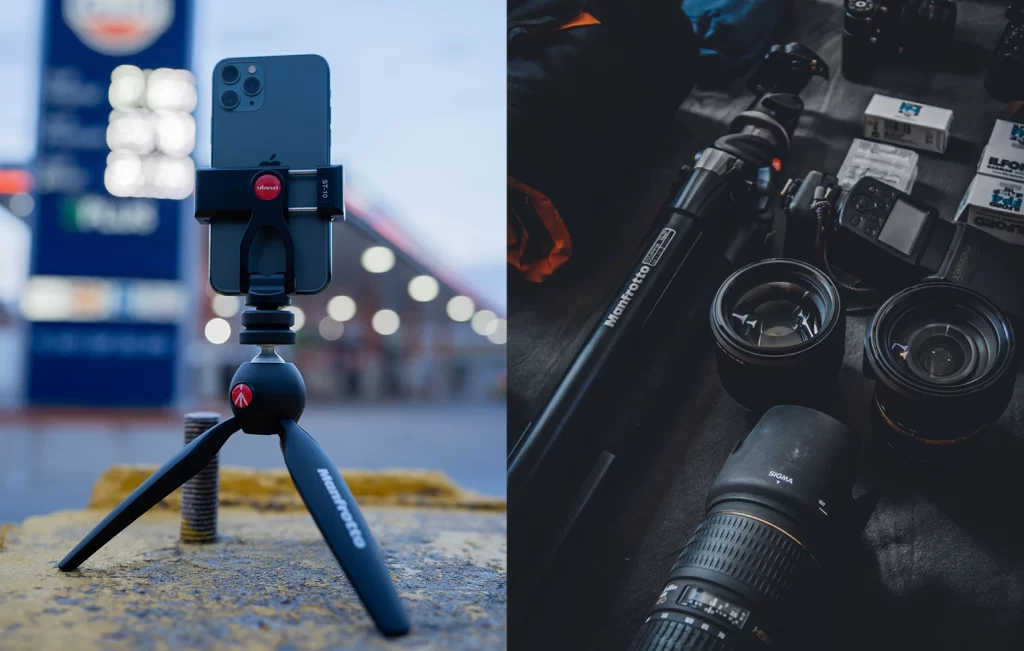
1. Use a Tripod
Eliminate blurry images caused by shaky hands.
- Traditional tripod: Works with both cameras and smartphones.
- Flexible tripod: Modern tripods like the Manfrotto Mini Universal Tripod allow bending legs to get creative angles.
2. Lighting
Good lighting is crucial.
- Natural light or soft studio lighting reduces shadows and ensures even exposure.
- For consistency, a lightbox can help achieve uniform lighting.
3. Background
Keep the background plain and neutral so the product stands out.
- Solid white or black backgrounds are ideal for professional presentation.
4. Camera Settings
Adjust your camera for optimal detail and sharpness.
- Shallow depth of field: Use a higher aperture (lower f-number).
- Adjust exposure for proper lighting: Tap on your screen to focus and use the sun icon to increase or decrease brightness.
5. Use Props
Props help tell a story about your product and provide context.
- Example: For Chinese New Year desserts, festive props create a mood and theme.
- Consider complementary colors, textures, and shapes for a visually balanced composition.
6. Edit Carefully
Editing enhances photos but avoid over-editing.
- Adjust color, brightness, and contrast without making the product look unnatural.
- Recommended software: Adobe Lightroom for basic edits, Photoshop for touch-ups, InShot or PS Express for mobile editing.
7. Multiple Angles
Take photos from different perspectives to show all product details.
- Example: Jewelry photographed from multiple angles highlights clasps, gemstones, and metalwork.
8. Consistency
Maintain a consistent style for professional and cohesive results, especially if part of a product series or campaign.
Additional Tips for Skill Improvement
- Practice regularly: Use your phone to capture everyday objects and scenes.
- Experiment with lighting, angles, and composition.
- Review and analyze your photos to refine your skills over time.
By following these tips, you’ll produce high-quality product photos that effectively showcase your products and strengthen your brand image, ultimately helping increase sales.
How Product Photography Improves Your Brand Impression
High-quality product photos do more than display your products—they tell a story about your brand. Consistent, well-styled visuals can:
- Build trust and credibility by clearly showing products.
- Increase perceived value, encouraging customers to purchase.
- Boost search visibility and engagement as visuals are more memorable than text.
For business owners struggling with online marketing, product photography helps communicate quality without words, supporting branding across websites, marketplaces, and social media.
How Lepakcreator Helps Businesses with Product Photography & Visual Strategy
Many small business owners know their products are great—but struggle to show them effectively online. At Lepakcreator, we:
- Develop a visual style aligned with your brand
- Guide on capturing the best product visuals
- Optimise images for web, SEO, and social media
- Build cohesive visual storytelling across multiple channels
We don’t just focus on taking photos—we focus on using photography to strengthen brand perception and online presence so your audience feels and trusts your products before buying.
People also Ask online:
Q: Why is product photography important for online brands?
Strong visuals build trust, improve conversions, and communicate quality.
Q: How can beginners take better product photos?
Use proper lighting, neutral backgrounds, multiple angles, props, and consistent style—even with a smartphone.
Q: What free tools can help edit product photos?
Tools like Canva, GIMP, InShot, or PS Express help adjust brightness, color, and crop.
Q: How can SMEs improve local search with product photos?
Optimise image alt text with local keywords (e.g., “handmade candles Singapore”), maintain consistent style, and showcase products in culturally relevant contexts.
Q: How do lifestyle shots improve conversion?
They help customers visualize product use, creating emotional connection and increasing purchase likelihood.
Q: How can product photos be integrated into omni-channel campaigns?
Maintain a unified visual style across website, social ads, TikTok, and email campaigns to reinforce brand identity.
Conclusion
Product photography isn’t just about taking pictures—it’s a brand communication tool that helps customers see, trust, and desire your products. With the right techniques, your visuals can elevate your brand, improve online presence, and drive sales.
So, which photography tip will you try first to strengthen your product’s brand impression today?
By following these tips, you should be able to produce high-quality product photos that effectively showcase your products and help increase sales.
👉🏻 Look out for the latest Marketing & related Tips @lepakcreator Telegram Channel!
(Credits: Renez, Pexels)
Since you’re here, why not Read: